
Connection to an Alation data catalog
To link the DQC Platform with Alation, you must authenticate using a dedicated API user and access token. This enables the DQC Platform to publish data quality metrics directly to your catalog entries — helping users understand asset quality at a glance.
About the Alation API
The Alation API is a RESTful interface supporting standard HTTP methods (GET, POST, PUT, DELETE) and JSON payloads. It uses OAuth2 for secure authentication. With the API, you can:
Search for data assets
Read or update metadata
Link DQC Platform quality results to catalog entries
You can find the official Alation API documentation via this link: Alation APIs.
Create an API user in Alation
Cloud deployments
Open Admin Settings > Manage Users
Create a new user for API usage (Users can be created via via the interface, see https://docs.alation.com/en/latest/admins/AdminSettings/ManageUsers.html )
Go to the user’s profile → Authentication tab
Generate a New Access Token
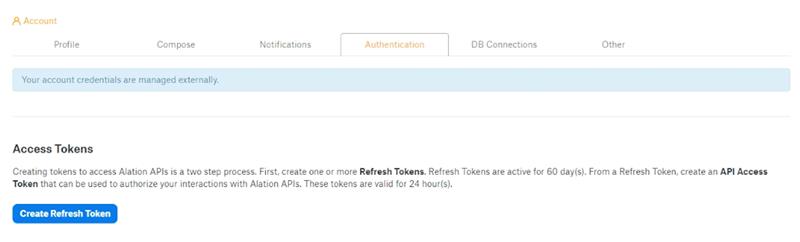 Use the token as the authentication key for connecting the DQC Platform.
On-premises environments with SSO
For installations using Single Sign-On, API users must be created directly on the server. Run the following commands as an admin:
sudo service alation shell
alation_django_shell

u = User.objects.create(username='dq_api', email='dq@example.com')
u.confirm_email(u.confirmation_key)
u.set_password("StrongPassword123!")
u.save()

from core.models import UserProfile
UserProfile.objects.create(user=u)
u.profile.assign_role(0)
u.profile.save()
Do not expose tokens or internal user names in shared documentation.
Connect the DQC Platform to Alation
Once you’ve created your API user:
Field in DQC Platform | Value from Alation |
|---|---|
Client ID | Alation username (API user) |
Client Secret | The access token generated for the user |
Alation Base URL | e.g. |
Project Name | Name of the DQC project where this data belongs |
Whitelist the DQC Platform IP address
To ensure stable connectivity, make sure your network allows access from the DQC Platform’s static IP:
3.123.94.228 Notes
Notes
The API user should have only the permissions required to write metadata
Multiple DQC projects can link to the same Alation environment
Learn more: Supported data sources, User roles and permissions