
v2.41
This release delivers smarter and faster AI-assisted rule creation, a new Tenant Manager role with expanded configuration rights, and safer Python node execution with clearer error insights. PDF imports now support adding the source file name, and a new CSV export provides a full overview of tenant permissions.
 New Features
Smarter DQ-AI Assistant for rule creation
AI-generated rule suggestions are now more precise and easier to understand due to improved rule name generations, helping teams create data quality rules with less manual tweaking
Improved string pattern suggestions and regex rule creation via the DQ-AI Assistant
The DQ-AI Assistant can now create "contains valid addresses" rules directly, reducing setup time for address-quality checks
Tenant Manager role
Introduction of a dedicated Tenant Manager role to streamline tenant administration
Tenant Owners can assign the Tenant Manager role in the Settings
The Tenant Manager inherits all edit rights of a Tenant Member and additionally gains permissions to edit:
Quality dimensions
Tags
Company rules
Improved Python node execution
Python nodes in the improvement workflow are now safer and easier to debug thanks to improved error handling and clearer messages
Stack traces are displayed directly in the Python node, making it easy to identify where code failed
Invalid libraries are now blocked more reliably to prevent runtime errors
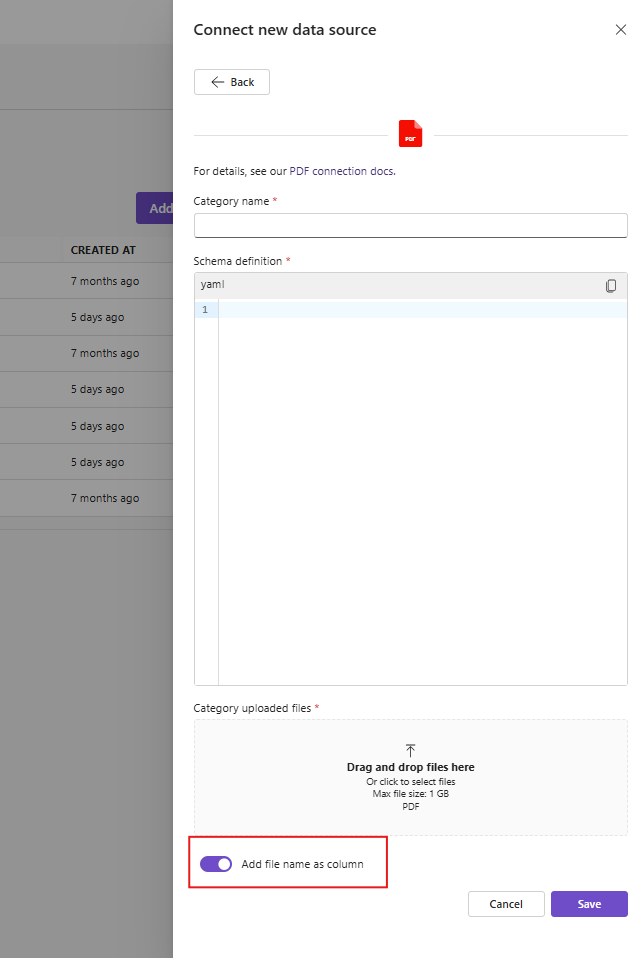
PDF connector: add source file name as a column
When importing data from PDFs, there is now a toggle to add the PDF file name as a column in the created table, improving traceability of each record back to its original file
This makes it easier to investigate issues by linking data rows back to the specific document they came from
Download the complete permission overview as a CSV file
New audit CSV download makes it possible to export all permission rights for a tenant, supporting external analysis, reviews, or compliance needs
Because object-level permissions can differ across connectors, tables, and rulesets, the export provides a full consolidated overview of which users and groups have view, edit, or coordinator rights across these objects
 Small improvements and bug fixes
Rule detail exports to external BI tools now correctly reflect changed dimensions
Synchronized handling of “download all issues” and “download sample issues”
User-facing errors in workflow nodes are more descriptive
Missions and alert links now include the ruleset name, so it’s clearer which rules triggered notifications
Dashboard: Renamed “Checked tables” to “Checked rulesets”
 Breaking Changes
Missions or Alerts that send notifications to Microsoft Teams channels and still use the old webhook URL stopped working after November 30, 2025
Microsoft has updated the webhook format, so users must create a new workflow and add a new Teams channel with the updated URL in the DQC Platform
From Microsoft:
Why is this happening?
We're undertaking a necessary infrastructure upgrade to support platform enhancements and new features at runtime. Currently, your flow is still supporting the old infrastructure if the trigger URL contains logic.azure. To ensure continued functionality, please update all references to your flow using the new URL, which can be found by opening the flow in the designer. Both the old and new URLs will continue to function until November 30, 2025. After this date, only the new URL will be supported. Please make sure to update your references before then to avoid any service disruptions.