
Quality ratio
The quality ratio reflects how closely your data aligns with its ideal state. It is calculated per rule and represents the proportion of valid entries compared to the total evaluated rows.
Rather than just counting issues, the quality ratio provides a normalized percentage — enabling easier comparison across small and large tables, columns, and rulesets.
How the quality ratio is calculated
The quality ratio is computed at multiple levels:
Rule level
Formula:
(Total rows for this rule – Issue rows) / Total rows for this rule
Notes:
"Total rows" excludes rows filtered out by rule conditions
Rows with excluded NULLs are not counted in the denominator
Multi-column rules: The quality ratio is calculated only for the first selected column
Table-based rules: These are considered as being based on their own column. When calculating an average quality score for the table, keep in mind that all three table-based rules have either 0 or 1 issue but are still evaluated against the total row count
Column level
Average of all rule-level quality ratios for this column
Ruleset level
Average of all column-level quality ratios for the ruleset
Tenant / Dashboard level
Average of all ruleset-level ratios the user has access to
Example calculation
If a table has 1,000 rows and 50 rows violate a rule:
→ Quality Ratio = (1000 – 50) / 1000 = 95%
If 250 valid rows are later added:
→ Quality Ratio = (1250 – 50) / 1250 = 96%

 Where quality ratio is displayed
(1) Quality scores
Each ruleset receives a score based on the quality ratio. These boundaries can be configured per ruleset. The default thresholds are:
Grade | Threshold |
|---|---|
A | > 99% valid entries |
B | > 95% |
C | > 90% |
D | > 85% |
E | ≤ 85% |
(2) Quality trend charts
Displayed across the platform — on:
Rule level
Ruleset level
Tenant level
In each chart, you can toggle between:
Issue counts
Quality ratio (%)
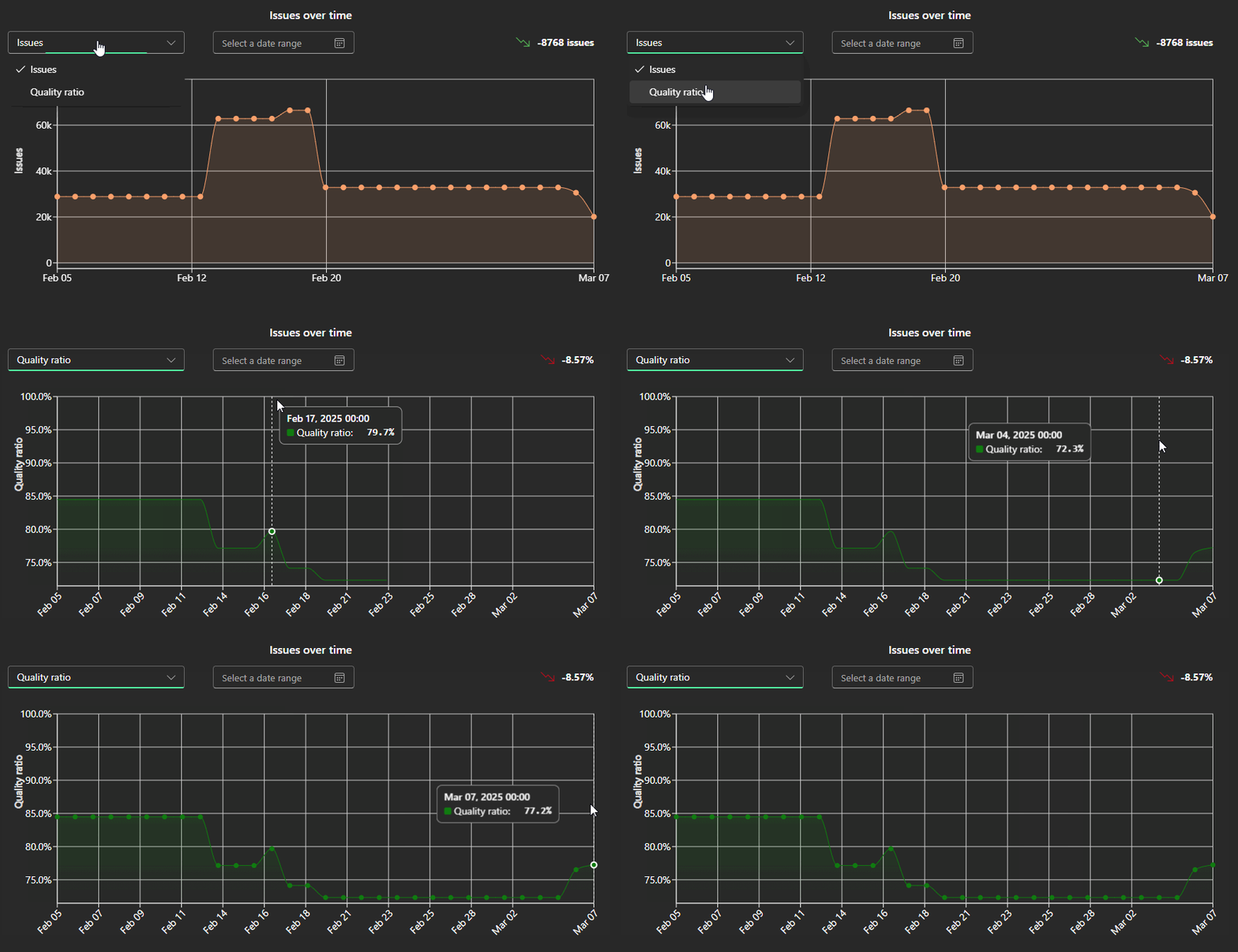 Visualize how quality improves or declines over time.
Use cases
Benchmark data quality across business units
Track improvement over time
Identify underperforming areas needing attention
Share quality scores with stakeholders via BI dashboards
 Notes
Notes
Quality ratio calculations update automatically after each data check
Rules with filters only consider rows matching those filters
Learn more: The Issue Table, Setting up a Ruleset Check