
Connection to SAP HANA
To connect a SAP HANA DB to the DQC Platform, you’ll need to collect a few key pieces of configuration. This guide walks you through all required values, token creation, and permission setup.
 This page covers the SAP HANA database connector. For an overview of all ways to bring SAP data into DQC — including OData and third-party connectors — see Connecting to SAP systems.
Required connection details
Field | Example | Description |
|---|---|---|
Name |
| Any internal name for this connection |
User | SAP HANA DB technical user | |
Password | SAP HANA DB password for technical user | |
Host |
| Either hostname (URL) or IP address of the HANA DB |
Port |
| |
Database | Selected SAP HANA DB: e.g., | |
Schema |
| Schema to which you want to connect (optional) |
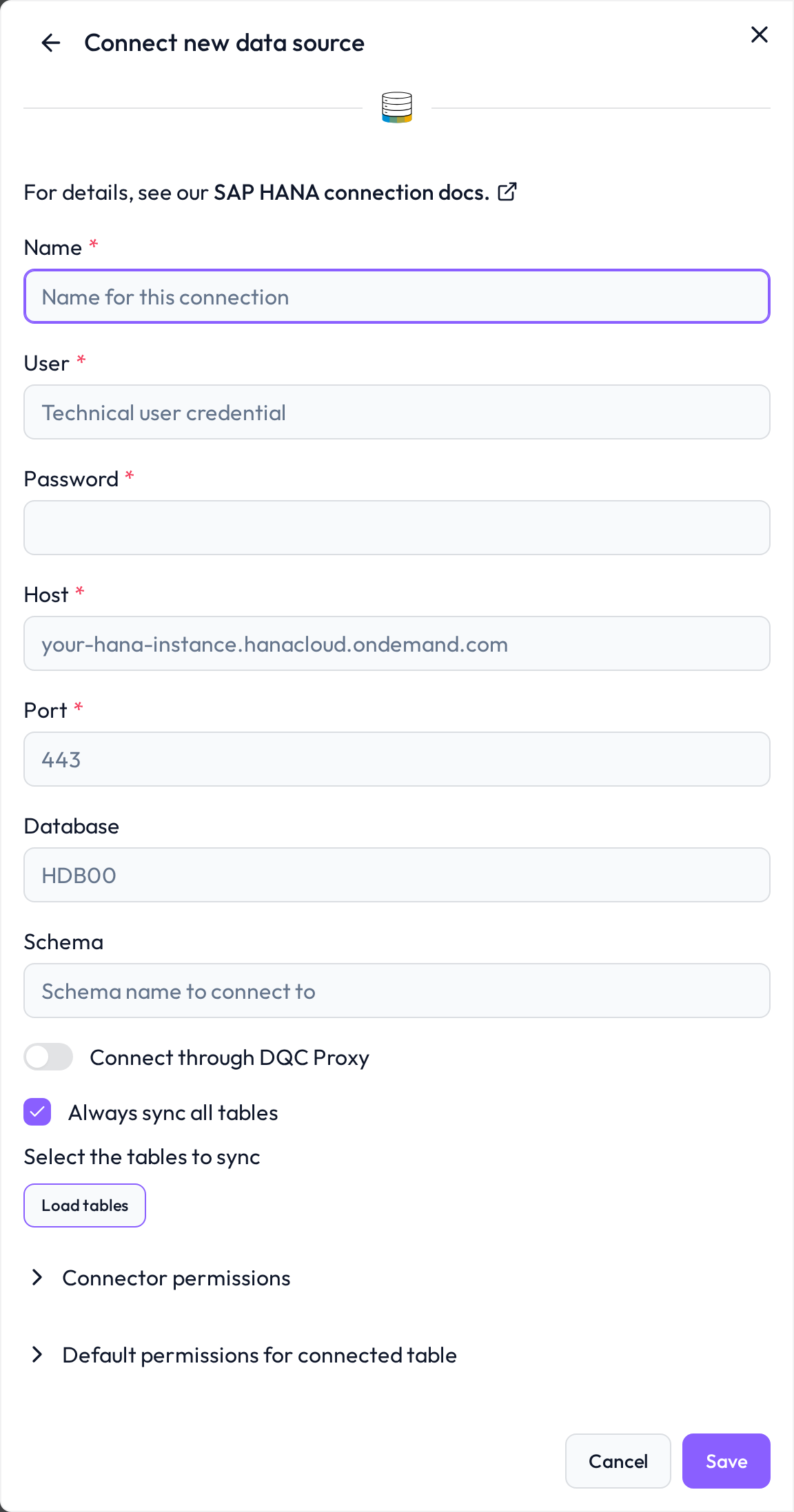 Enter the connection values in the integration form shown above
Create a SAP HANA
This guide walks through the complete setup process for connecting DQC to your SAP HANA database with security and performance best practices.
Create Technical User
Connect to SAP HANA Database Explorer or HANA Studio and execute:
-- Create technical user for DQC
CREATE USER dqc_service_user PASSWORD \"ChangeMe123!\"
    NO FORCE_FIRST_PASSWORD_CHANGE;

-- Set password policy
ALTER USER dqc_service_user
    SET PARAMETER PASSWORD_LOCK_TIME = 1440,  -- 24h lockout after failures
    SET PARAMETER FAILED_CONNECT_ATTEMPTS_BEFORE_LOCK = 3;

-- Create role for DQC access
CREATE ROLE z_dqc_read_only;

-- Grant basic connection privileges
GRANT CONNECT TO z_dqc_read_only;

-- Grant usage on SAP schema (replace P01 with your SID)
GRANT USAGE ON SCHEMA P01 TO z_dqc_read_only;
```

### Step 3: Grant Access to Specific Tables

**Option A: Direct Table Access (Simple)**


-- Grant SELECT on specific tables only (White-list approach)
GRANT SELECT ON P01.MARA TO z_dqc_read_only;  -- Material Master
GRANT SELECT ON P01.MARC TO z_dqc_read_only;  -- Material Plant Data
GRANT SELECT ON P01.MAKT TO z_dqc_read_only;  -- Material Descriptions
GRANT SELECT ON P01.KNA1 TO z_dqc_read_only;  -- Customer Master
GRANT SELECT ON P01.LFA1 TO z_dqc_read_only;  -- Vendor Master

-- Add more tables as needed


**Option B: Filtered Views (Recommended for Subsidiaries)**


-- Create schema for DQC views
CREATE SCHEMA Z_DQC_VIEWS;
GRANT USAGE ON SCHEMA Z_DQC_VIEWS TO z_dqc_read_only;

-- Create filtered view (e.g., Germany subsidiary only)
CREATE VIEW Z_DQC_VIEWS.V_KNA1_DE AS
SELECT
    KUNNR,
    NAME1,
    NAME2,
    ORT01,
    PSTLZ,
    LAND1,
    BUKRS,
    VKORG
FROM P01.KNA1
WHERE BUKRS = '1000'  -- Only Germany company code
  AND (LOEVM IS NULL OR LOEVM = '');  -- Active customers only

COMMENT ON VIEW Z_DQC_VIEWS.V_KNA1_DE IS
'DQC View: Customer Master - Germany Subsidiary (BUKRS 1000) - Active only';

-- Grant access to view
GRANT SELECT ON Z_DQC_VIEWS.V_KNA1_DE TO z_dqc_read_only;

-- Assign role to technical user
GRANT z_dqc_read_only TO dqc_service_user;
Configuring resource limits
-- Create workload class with resource limits
CREATE WORKLOAD CLASS dqc_limited_workload SET
  'PRIORITY' = '5',                              -- Medium-low priority (1=high, 9=low)
  'STATEMENT_MEMORY_LIMIT' = '16384',            -- Max 16GB per query
  'TOTAL_STATEMENT_MEMORY_LIMIT' = '32768',      -- Max 32GB total
  'STATEMENT_THREAD_LIMIT' = '4',                -- Max 4 CPU threads per query
  'TOTAL_THREAD_LIMIT' = '8',                    -- Max 8 threads total
  'STATEMENT_TIMEOUT' = '300000',                -- 5 min timeout (milliseconds)
  'ADMISSION_CONTROL_QUEUE_TIMEOUT' = '60000';   -- 1 min max wait time

-- Assign workload class to user
ALTER USER dqc_service_user
  SET PARAMETER WORKLOAD_CLASS_NAME = 'dqc_limited_workload';

-- Limit concurrent connections
ALTER USER dqc_service_user
  SET PARAMETER CLIENT_MAX_CONNECTIONS = 3;  -- Max 3 parallel connections
Configure audit logging
CREATE AUDIT POLICY dqc_user_audit
  AUDITING
    SUCCESSFUL CONNECT,
    UNSUCCESSFUL CONNECT,
    SELECT ON P01.MARA,
    SELECT ON P01.MARC,
    SELECT ON P01.KNA1,
    SELECT ON Z_DQC_VIEWS.*
  FOR dqc_service_user;

-- enable

ALTER AUDIT POLICY dqc_user_audit ENABLE;
Allow static IP access - only required for SaaS / SaaS+ customers
The DQC Platform connects using static IP addresses. Ensure that these are whitelisted in your environment:
3.123.94.228 Notes
Notes
For most production environments, we strongly recommend using a limited technical user
The connection is read-only and encrypted
Learn more: Supported data sources, Azure SQL connection, Connection to Snowflake, Connection to Databricks