
SAP Integration Guide
Overview
DQC Platform provides comprehensive integration with SAP systems through two main approaches:
Data Connection - Connect to SAP data sources to analyze and monitor data quality
Issue Prevention - Integrate validation API into SAP applications to prevent bad data entry
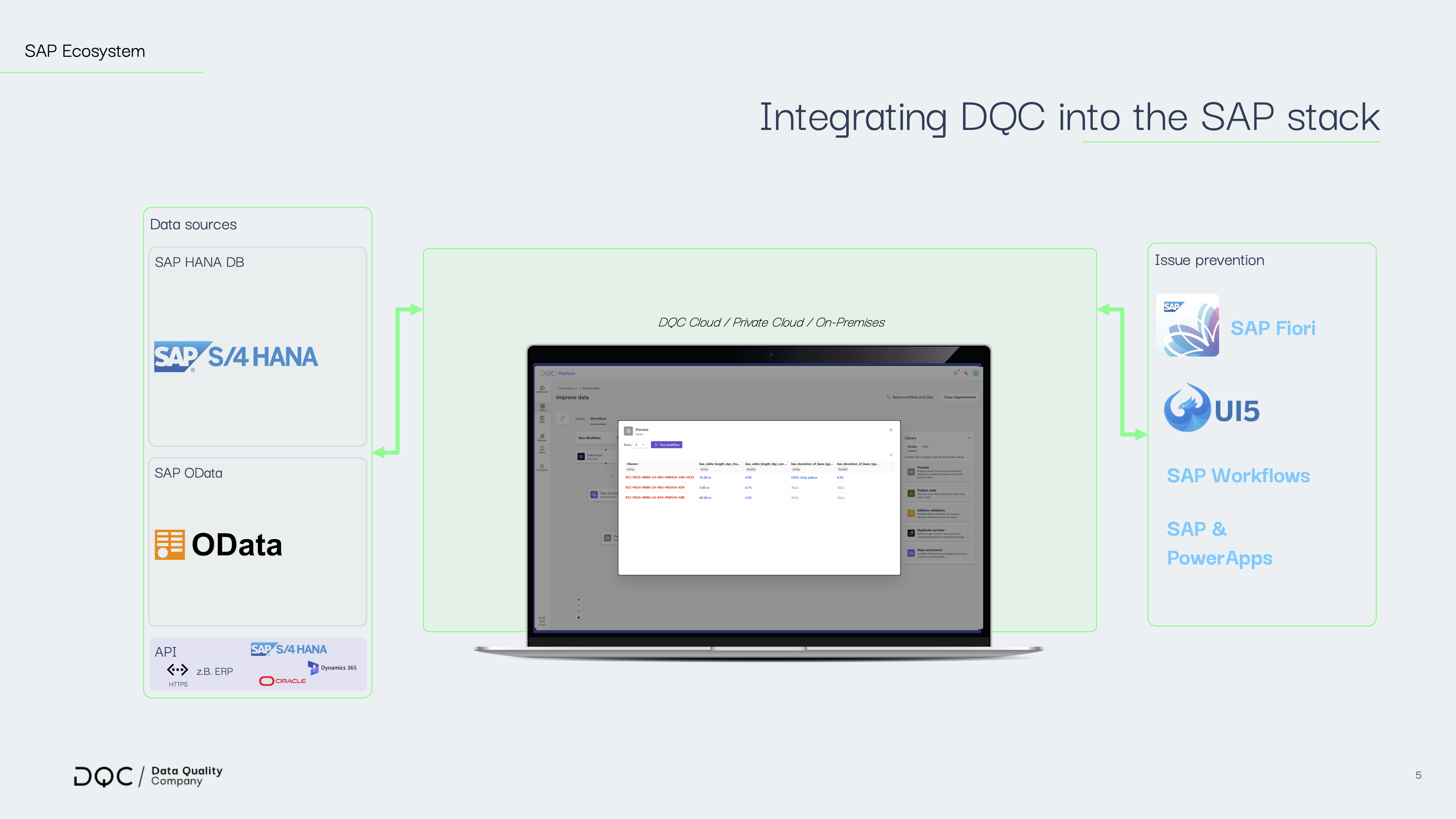
Part 1: Data Connection
Connect DQC Platform to your SAP data sources for continuous data quality monitoring and analysis.
1.1 SAP HANA Database Connection
Connect directly to SAP HANA databases to analyze data quality at the source.
Prerequisites
SAP HANA database access credentials
Network connectivity to HANA instance
SSL/TLS enabled (recommended)
Connection Features
Automatic type mapping: HANA data types are automatically mapped to standard SQL types
Optimized sampling: Large tables are intelligently sampled (up to 100,000 rows) for performance
SSL encryption: All connections use encrypted SSL by default
Schema support: Full support for multi-schema environments
See Connecting SAP HANA for detailed connection steps
Troubleshooting
Connection timeout:
Verify network connectivity:
telnet hana.yourcompany.com 443Check firewall rules allow outbound connections
Ensure HANA instance is running
Permission denied:
Verify user has SELECT permissions on target schema
Check schema name is correct (case-sensitive)
Table not found:
Confirm schema name matches your HANA configuration
Check table exists:
SELECT * FROM SYS.TABLES WHERE SCHEMA_NAME = 'YOUR_SCHEMA';
1.2 SAP OData Service Connection
Connect to SAP systems via OData services (supported by SAP S/4HANA, SAP Gateway, SAP BW, SAP DWC).
Prerequisites
OData service endpoint URL
Authentication credentials (Basic Auth or OAuth 2.0)
Network access to SAP system
See Connecting OData for detailed connection steps
SAP Data Warehouse Cloud (DWC) Support
DQC automatically detects and handles SAP DWC Catalog API format:
Automatically discovers exposed data assets
Supports both relational and analytical data URLs
No additional configuration needed
Connection Features
Automatic entity discovery: System discovers available OData entities automatically
Character encoding handling: Automatic UTF-8 encoding with double-encoding fix
OAuth token management: Automatic token acquisition and refresh
Empty table filtering: Automatically skips empty entity sets
Navigation property handling: Filters out navigation properties (
to_*properties)
Troubleshooting
Invalid Schema error:
Verify the service URL is correct
Check OData version matches your SAP system
Test URL in browser:
https://your-service-url/$metadata
Authentication failed:
For basic auth: Verify username/password
For OAuth: Check client credentials and token URL
Ensure user has authorization to access the OData service
Table/Entity not found:
Verify entity name spelling (case-sensitive)
Check entity is exposed in the OData service
Try accessing metadata:
{service_url}/$metadata
No tables/entities discovered:
Service might require custom headers (check with SAP admin)
Ensure service returns non-empty entity sets
Check service permissions
Part 2: Issue Prevention with Validation API
Integrate DQC validation into your SAP applications to prevent bad data from entering your systems.
2.1 Overview
The DQC Validation API provides real-time data quality validation that can be embedded into:
SAP Fiori applications
SAP UI5 custom applications
SAP Power Apps integrations
Custom SAP web forms
SAP workflow validation steps
2.2 API Endpoint
POST https://your-dqc-instance.com/apiV2/validation/ruleset/{ruleset_id}
Headers
Header | Required | Description | Example |
|---|---|---|---|
| Yes | Must be |
|
| Yes | Bearer token or API key |
|
| Yes | Your DQC tenant identifier |
|
Query Parameters
Parameter | Type | Default | Description |
|---|---|---|---|
| boolean |
| Return detailed validation results with all issues |
| boolean |
| Return simplified format optimized for SAP/PowerApps |
| boolean |
| Return response as JSON string (for certain integrations) |
2.3 Request Format
{
  "requestId": "unique-request-id-12345",
  "data": [
    {
      "fieldName1": {
        "type": "string",
        "value": "Sample Value"
      },
      "fieldName2": {
        "type": "number",
        "value": 12345
      },
      "dateField": {
        "type": "date",
        "value": "2024-01-15",
        "dateFormat": "YYYY-MM-DD"
      }
    }
  ],
  "rulesToApply": [],
  "options": {
    "validateAgainstAllRules": true,
    "returnDetailedResults": true
  }
}
Field Structure
Each field in your data follows this structure:
{
  "type": "string|number|date|boolean",
  "value": "actual value",
  "dateFormat": "optional, only for date types"
}
Supported Types:
string- Text valuesnumber- Numeric values (integer or decimal)date- Date values (specify format indateFormat)boolean- True/false values
2.4 Response Formats
Standard Response (powerapps_format=true)
{
  "requestId": "unique-request-id-12345",
  "success": false,
  "totalIssues": 2,
  "issuesByField": [
    {
      "customerName": [
        "Customer name must not contain special characters",
        "Customer name must be at least 3 characters long"
      ]
    }
  ],
  "globalIssues": [
    "Email and phone number cannot both be empty"
  ]
}
Detailed Response (detailed=true)
{
  "requestId": "unique-request-id-12345",
  "totalRowsValidated": 1,
  "totalIssues": 2,
  "passed": false,
  "ruleResults": [
    {
      "ruleId": "c4ca4238-a0b9-3382-8dcc-509a6f75849b",
      "ruleName": "Customer Name Format",
      "ruleDescription": "Customer name must be valid format",
      "totalIssues": 1,
      "passed": false,
      "issues": [
        {
          "rowIndex": 0,
          "columnName": "customerName",
          "value": "AB",
          "expectedPattern": "Min 3 characters, no special chars",
          "errorMessage": "Customer name must be at least 3 characters long"
        }
      ]
    }
  ]
}
2.5 SAP Integration Examples
Example 1: SAP UI5 / Fiori Integration
// In your SAP UI5 controller
validateCustomerData: async function(customerData) {
    const rulesetId = "your-ruleset-uuid";
    const tenantId = "your-tenant-uuid";

    // Transform SAP data to DQC format
    const validationRequest = {
        requestId: this.generateRequestId(),
        data: [{
            customerName: {
                type: "string",
                value: customerData.Name
            },
            email: {
                type: "string",
                value: customerData.Email
            },
            creditLimit: {
                type: "number",
                value: customerData.CreditLimit
            }
        }],
        rulesToApply: [],
        options: {
            validateAgainstAllRules: true,
            returnDetailedResults: true
        }
    };

    // Call DQC validation API
    const response = await fetch(
        `https://your-dqc-instance.com/apiV2/validation/ruleset/${rulesetId}?powerapps_format=true`,
        {
            method: 'POST',
            headers: {
                'Content-Type': 'application/json',
                'Authorization': 'Bearer ' + this.getAuthToken(),
                'X-Tenant-ID': tenantId
            },
            body: JSON.stringify(validationRequest)
        }
    );

    const result = await response.json();

    // Handle validation results
    if (!result.success) {
        this.showValidationErrors(result.issuesByField, result.globalIssues);
        return false;
    }

    return true;
},

showValidationErrors: function(issuesByField, globalIssues) {
    // Display field-specific errors
    issuesByField.forEach(fieldIssues => {
        Object.keys(fieldIssues).forEach(fieldName => {
            const errors = fieldIssues[fieldName];
            this.setFieldErrors(fieldName, errors);
        });
    });

    // Display global errors
    if (globalIssues.length > 0) {
        MessageBox.error(globalIssues.join('\n'));
    }
}
Example 2: SAP OData Service Integration (Backend Validation)
For server-side validation in SAP Gateway or CDS services:
METHOD validate_before_create.
  DATA: lv_validation_url   TYPE string,
        lv_request_body     TYPE string,
        lv_response         TYPE string,
        lo_http_client      TYPE REF TO if_http_client,
        lv_tenant_id        TYPE string VALUE 'your-tenant-uuid',
        lv_ruleset_id       TYPE string VALUE 'your-ruleset-uuid'.

  " Build validation request
  lv_request_body = |{
    "requestId": "{ cl_system_uuid=>create_uuid_x16_static( ) }",
    "data": [{
      "materialNumber": {
        "type": "string",
        "value": "{ iv_material_number }"
      },
      "quantity": {
        "type": "number",
        "value": { iv_quantity }
      }
    }],
    "rulesToApply": [],
    "options": {
      "validateAgainstAllRules": true,
      "returnDetailedResults": true
    }
  }|.

  " Create HTTP client
  lv_validation_url = |https://your-dqc-instance.com/apiV2/validation/ruleset/{ lv_ruleset_id }?powerapps_format=true|.

  cl_http_client=>create_by_url(
    EXPORTING url = lv_validation_url
    IMPORTING client = lo_http_client ).

  " Set headers
  lo_http_client->request->set_header_field(
    name  = 'Content-Type'
    value = 'application/json' ).
  lo_http_client->request->set_header_field(
    name  = 'X-Tenant-ID'
    value = lv_tenant_id ).
  lo_http_client->request->set_header_field(
    name  = 'Authorization'
    value = |Bearer { get_auth_token( ) }| ).

  " Send request
  lo_http_client->request->set_method( 'POST' ).
  lo_http_client->request->set_cdata( lv_request_body ).
  lo_http_client->send( ).
  lo_http_client->receive( ).

  " Parse response
  lv_response = lo_http_client->response->get_cdata( ).

  " Handle validation result
  DATA(lv_success) = /ui2/cl_json=>deserialize(
    json = lv_response
    pretty_name = /ui2/cl_json=>pretty_mode-camel_case ).

  IF lv_success-success = abap_false.
    " Raise exception with validation errors
    RAISE EXCEPTION TYPE zcx_validation_failed
      EXPORTING
        issues = lv_success-issues_by_field.
  ENDIF.
ENDMETHOD.
Example 3: SAP Power Apps Integration
// In your PowerApps OnSelect or OnChange event
With(
    {
        ValidationResult: DQCValidation.Run(
            {
                requestId: GUID(),
                data: [
                    {
                        customerName: {
                            type: "string",
                            value: TextInput_CustomerName.Text
                        },
                        email: {
                            type: "string",
                            value: TextInput_Email.Text
                        }
                    }
                ],
                rulesToApply: [],
                options: {
                    validateAgainstAllRules: true,
                    returnDetailedResults: true
                }
            }
        )
    },
    If(
        ValidationResult.success,
        // Proceed with data submission
        SubmitForm(Form_Customer),
        // Show validation errors
        Set(varValidationErrors, ValidationResult.issuesByField);
        UpdateContext({ShowErrorDialog: true})
    )
);
2.6 Best Practices
Performance Optimization
Batch validation: Validate multiple records in a single API call when possible
Client-side caching: Cache ruleset configurations to reduce API calls
Asynchronous validation: Use async/await or promises to prevent UI blocking
Selective validation: Use
rulesToApplyparameter to validate specific rules only
Error Handling
Network failures: Implement retry logic with exponential backoff
Timeout handling: Set appropriate timeouts (recommended: 10-30 seconds)
Fallback behavior: Define what happens if validation service is unavailable
Logging: Log validation requests and responses for debugging
Security
Secure token storage: Store API tokens securely (SAP Secure Store, Key Vault)
HTTPS only: Always use HTTPS for API calls
Token rotation: Implement automatic token refresh logic
Rate limiting: Be aware of API rate limits and implement throttling
User Experience
Inline validation: Show validation errors near the relevant fields
Clear messaging: Use user-friendly error messages from the API response
Progressive validation: Validate on field blur, not just on submit
Loading indicators: Show loading state during validation