
Table – Rules Screen
The Rules tab in the DQC Platform provides an overview of all data quality rules defined for a specific table. It allows users to activate, manage, and create rules—either manually or with the help of the DQ-AI Assistant.
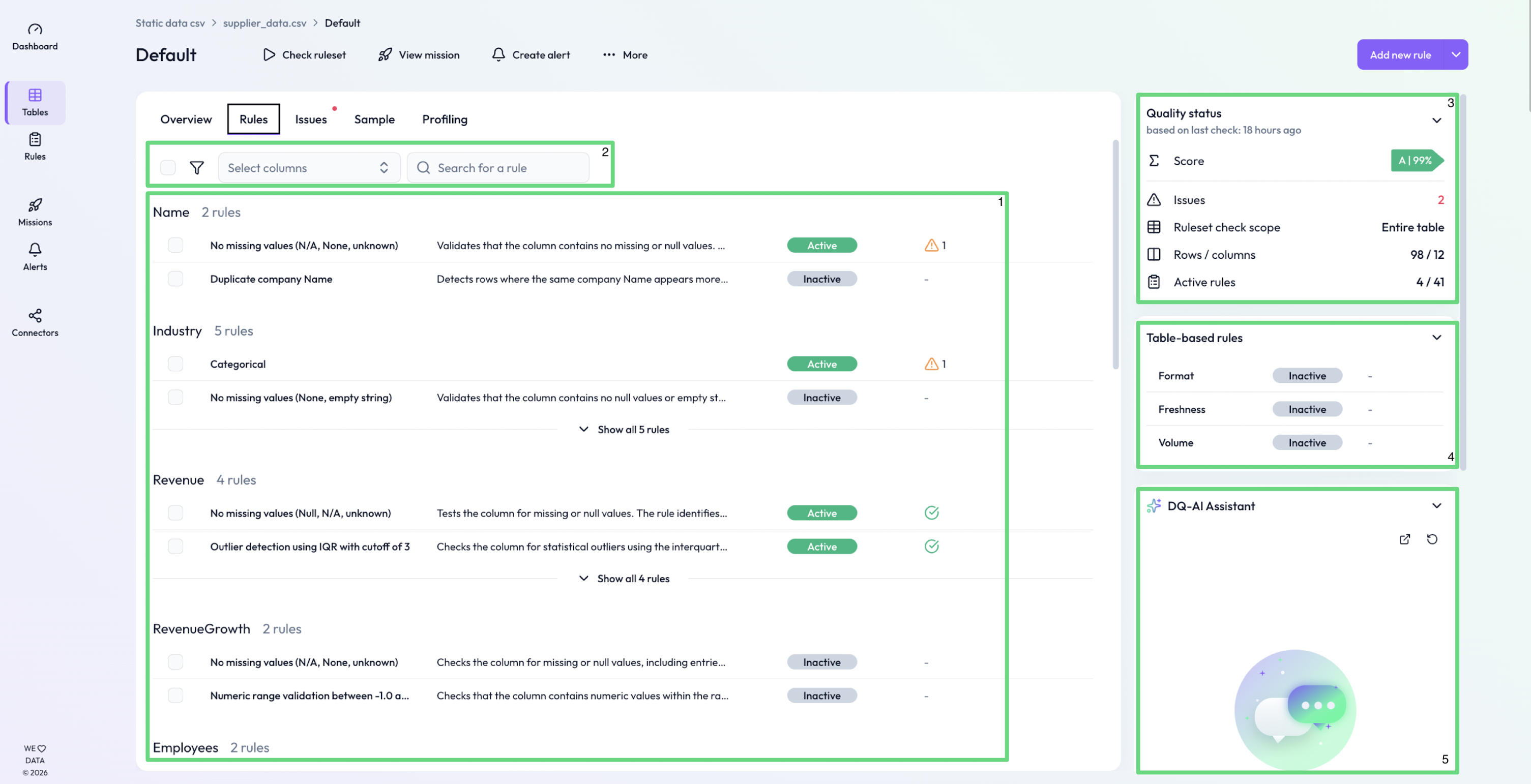
(1) Rule overview per column
Each column with data quality rules is listed in its own section. For each rule, you can see:
Rule name (e.g., “Not empty”, “Categorical”)
Short description – Describes what the rule checks
Status – Indicates whether the rule is active or inactive
Issues – Number of current rule violations
(2) Rule management tools
When one or more rules are selected via checkbox, the top action bar becomes active:
Activate / Deactivate – Toggle status of multiple rules at once
Export – Download the selected rules as a JSON file
Delete – Remove selected rules in bulk
(3) Quality status
The top-right panel summarizes the table’s quality metrics:
Score – Overall quality score (A–E) from the last table check
Issues – Number of issues found
Table check scope – Indicates whether a sample or full table was used
Rows / columns – Total number of rows and columns checked
Active rules – How many of the rules are currently active
(4) Table-based rules
Three table-based rules that are automatically generated:
Format – ensures schema consistency by comparing the current table schema with the valid schema.
Freshness – Validates whether the data in a date column is up to date—e.g., not older than a defined threshold (e.g., 7 days).
Value – Checks whether the number of rows in a table meets a defined minimum or maximum threshold.
(5) DQ-AI Assistant
On the right-hand side, the DQ-AI Assistant can help generate new rules using natural language input.
Type a prompt (e.g., “Contract_Number should be mandatory”)
The assistant suggests a rule and its logic
Click “Apply” to create the rule in the current table
 Notes
Notes
Rules can be added, removed, or edited individually or in bulk
Use rule exports to transfer rule configurations across tables
Learn more: Creating Rules with the Assistant, Quality Scores, Exporting and Importing Rule Sets