
v3.11
Release 3.11 expands the Address node in Improvement workflows: it can enrich addresses with coordinates and additional address fields, look up an address from latitude and longitude, and report how well each row matched. Also, ask AI helps configure the whole node.
The DQ Assistant gets more context about actual column values, and a new MCP service lets external AI assistants work with DQ Platform using your account and permissions.
🚀 New Features
Address enrichment and reverse lookup
The Address node separates the columns used to look up an address from the columns receiving the result. Output columns can be empty or contain old values without affecting the lookup.
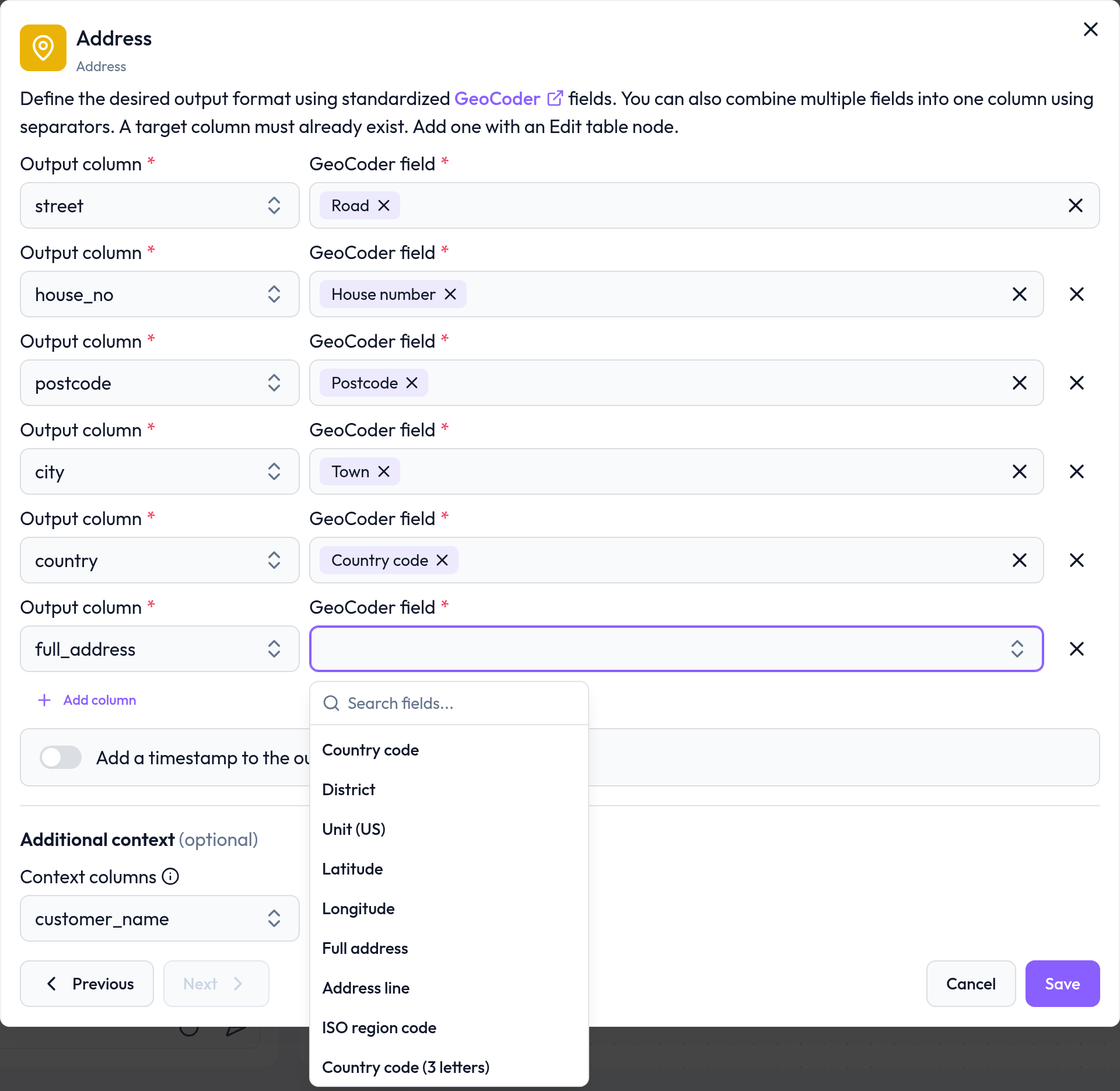
Map results to latitude, longitude, full address, address line, district, unit, country codes and region codes, in addition to the existing address fields. Also, the geocoder field picker is now searchable.
Select latitude and longitude columns to look up an address from coordinates. Coordinates also help check a text-based address match and provide a fallback when no address can be found from the text.
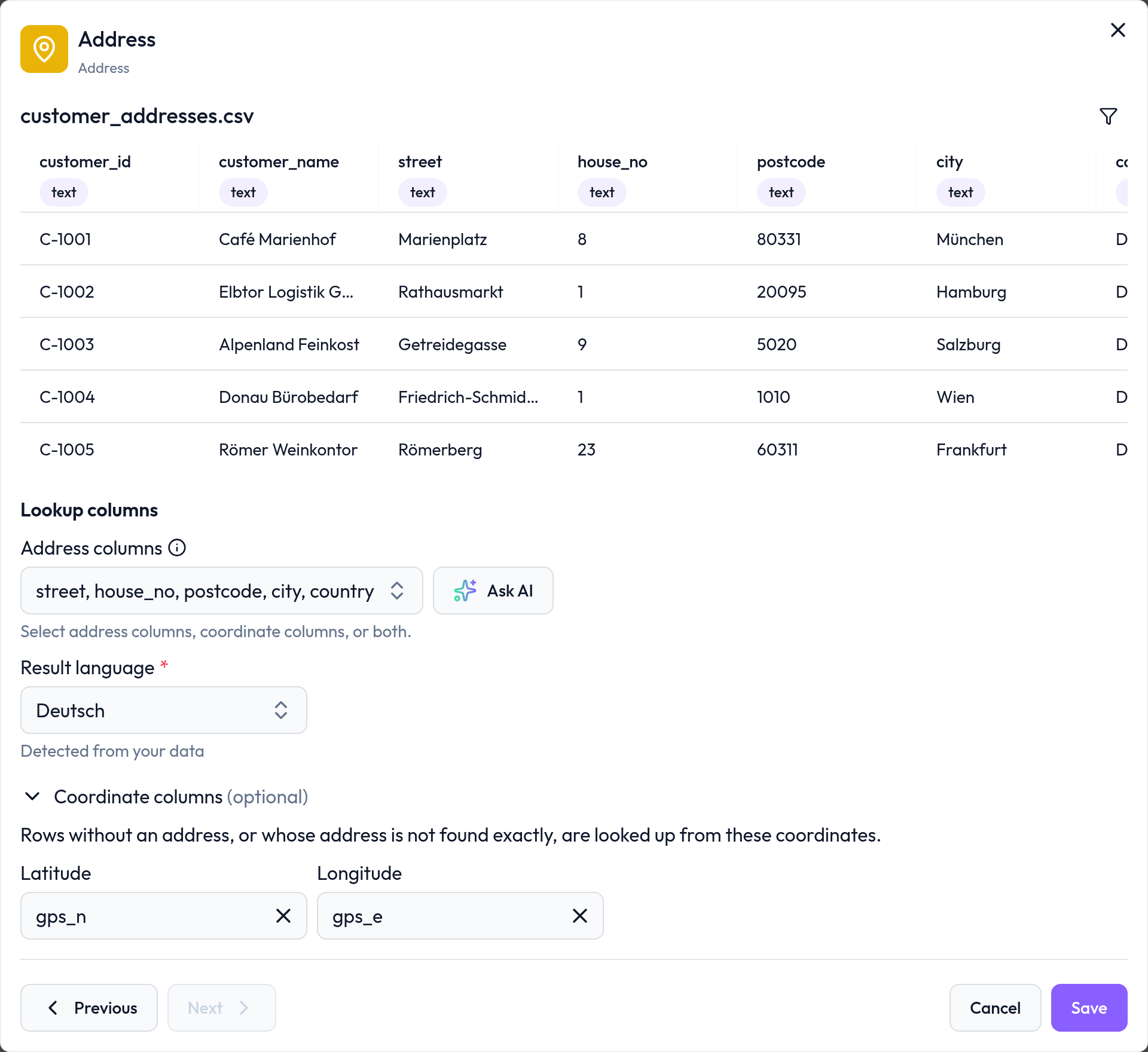
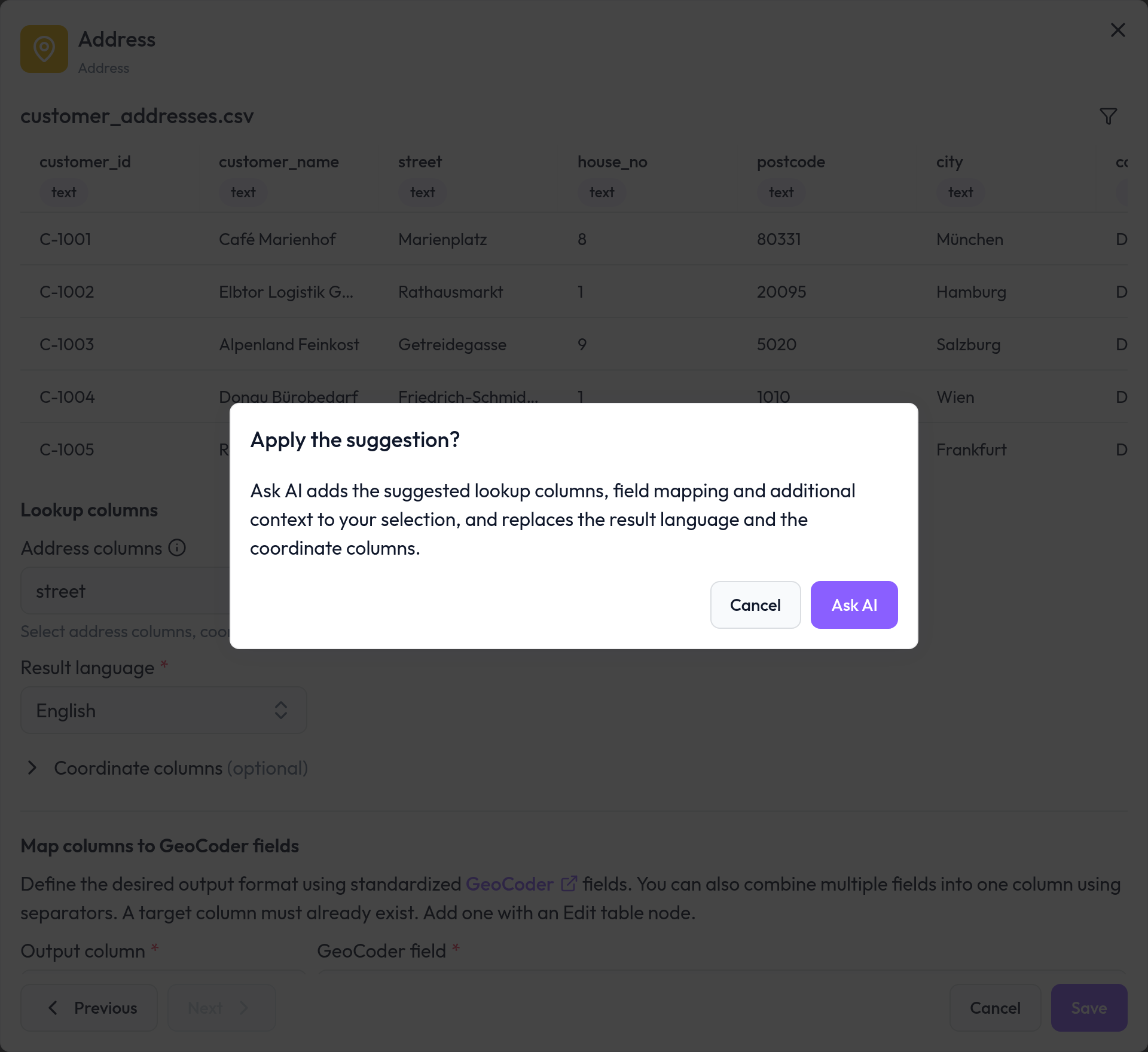
Ask AI suggests lookup columns, output mappings, business context, coordinate columns and result language. Suggestions can be reviewed before applying them; existing output mappings are preserved when adding suggestions.
A new
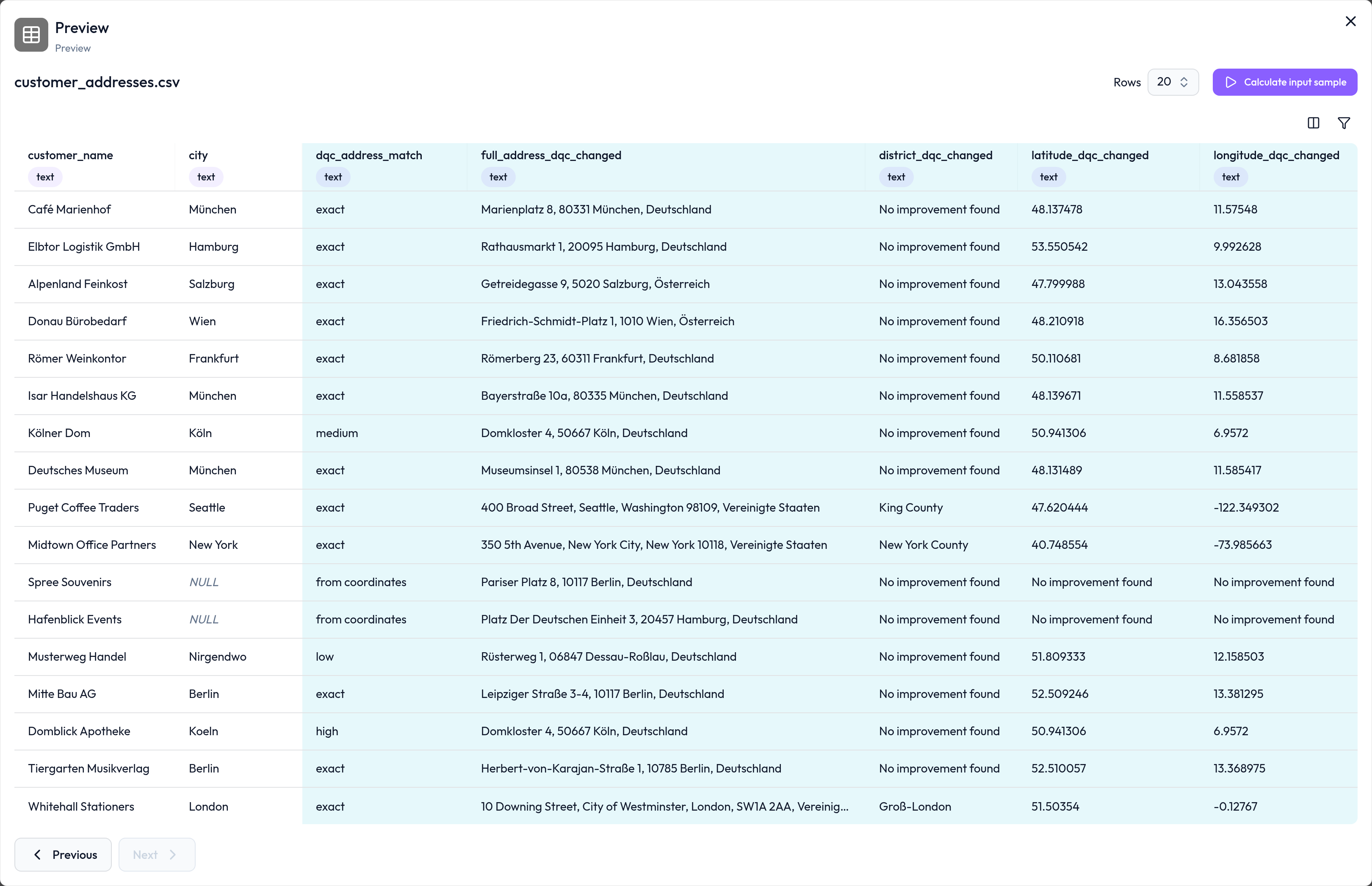
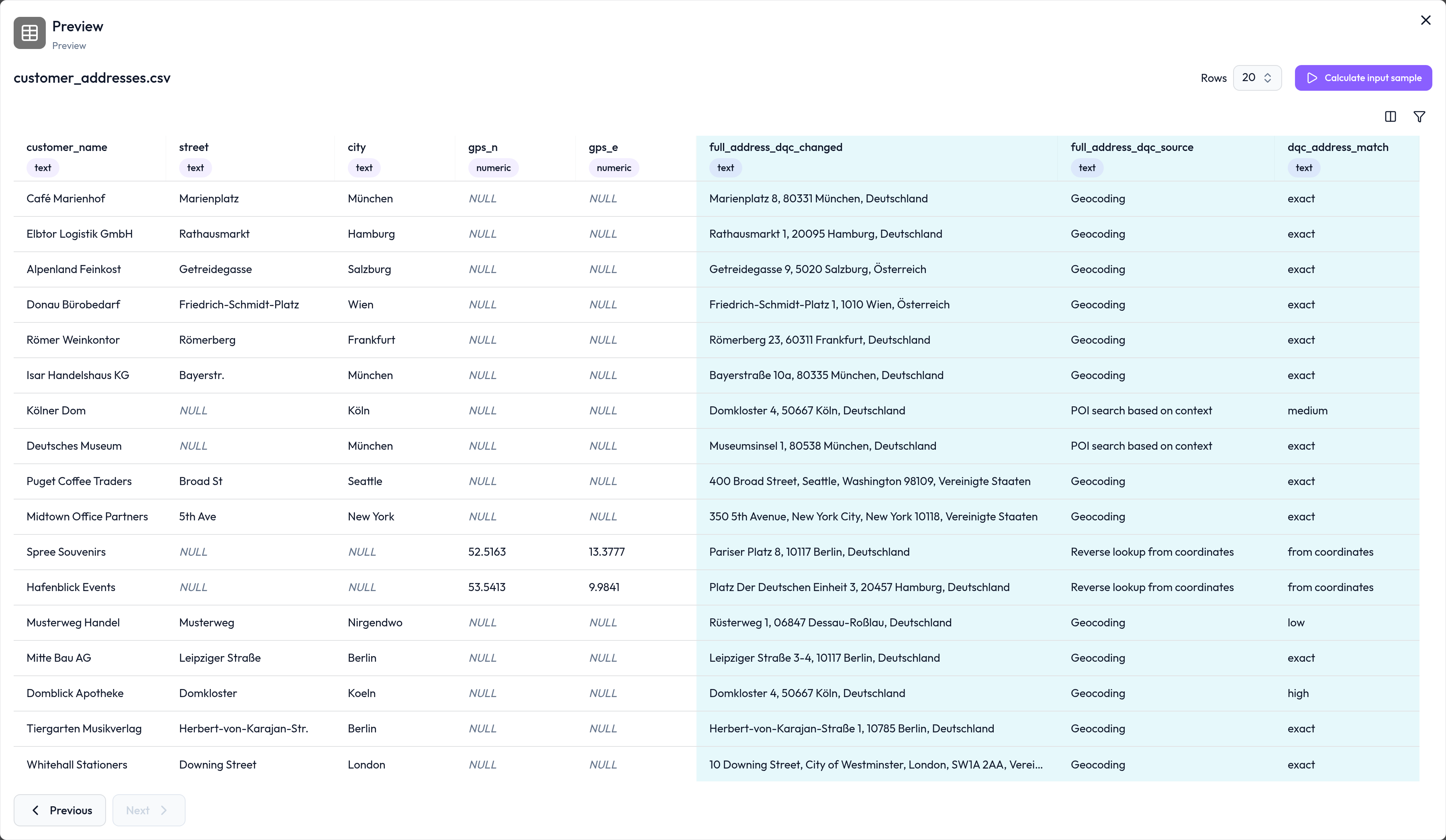
dqc_address_matchoutput column records how well an address matched. Values distinguish exact, high, medium and low matches, results at street or area level, matches from coordinates, and addresses that were not found. The column follows the node's output naming setting.
Dialog populated by Ask AI: Lookup columns, Result language "German" with the note "Detected from your data", "Coordinate columns" section with Latitude |
|
GeoCoder field dropdown with a "Search fields..." input and the eight new fields: District, Unit (US), Latitude, Longitude, Full address, Address line, ISO region code, and Country code (3 letters). |
|
Prompt asking "Apply the suggestion?" because a column |
|
Preview node following the Address and Edit table steps, showing all 17 rows: column |
|
The same preview with input columns |
|
Connect external assistants through MCP (early access, please reach out)
The Model Context Protocol (MCP) service lets compatible AI clients discover tables and rulesets, inspect quality results and profiling, and work with rules and Improvement workflows.
With write access, an assistant can also create or update rules, start checks and workflows, and upload supported files. The same object permissions apply as in the platform.
Sign in with your platform account. The consent page identifies the client, account and tenant; write access requires a separate selection. You do not need to create or copy an API key.
Personal data is scrubbed in responses sent through MCP, including samples, saved literal configuration values and downloaded results. Stored data and workflow inputs keep their original values.
MCP is enabled per tenant. For enabled tenants, sample access is on by default and can be disabled separately.
✨ Improvements
Consistent quality and check results
Dashboards, quality donuts, ruleset lists and historical charts handle unknown quality consistently. Aggregated quality skips unknown values; an aggregate with no measured values remains unknown.
Cross-connector checks also honour the ruleset's row filters, column scope, sample size and sorting when attaching another source.
More reliable address suggestions
Suggestions reflect the geocoder's confidence in each field and the overall match. A partial or approximate result no longer implies that every requested address component was found.
Business searches check whether a result names the intended business and use its address before falling back to its map position.
The supplied country acts as a hint. A failed or weak lookup can retry without it, so an incorrect country does not prevent finding the address.
Repeated lookup inputs share the lookup within one workflow run, including across batches. Each row still receives its own output values and confidence calculation.
DQ Assistant uses column value evidence
Rule requests that name columns can receive their value summary before rule generation, including frequent values, ranges, text lengths and prefixes.
Personal data in these value reports is masked while preserving its format, so the assistant can reason about patterns without receiving the original personal values.
Workflow configuration and previews
Node dialogs have clearer section names, descriptions and tooltips. Selected columns that no longer arrive from an earlier node are marked as unavailable.
The input preview row count is carried through when navigating between nodes, instead of reverting to another node's setting.
Switching the Data input source clears filters that belong to the previous source, preventing a broken filter from remaining in the workflow.
🤖 Small improvements and bug fixes
Issue exceptions handle boolean and numeric values received as text and skip columns that cannot be compared without failing the check.
When several pending invitations exist, sign-in offers the newest invitation instead of failing.
The alert list's Reported date shows the last notification sendout; Last updated shows when the alert itself changed.
⚡ Breaking Changes
API consumers reading check results must use
totalRowCountinstead ofrowCount, andscopedRowCountinstead ofcheckedRowCount, in run and last-successful-check responses.
☁️ Private Cloud
Release candidate image tags for platform version 3.11.0:
qui:
rc_d7c0c998457ae859f4e31a7974ec48c269ec5576qservices:
rc_amd_d7c0c998457ae859f4e31a7974ec48c269ec5576python-executor:
rc_amd_d7c0c998457ae859f4e31a7974ec48c269ec5576dqc-mcp (optional, AMD64):
rc_amd_d7c0c998457ae859f4e31a7974ec48c269ec5576
Platform version: 3.11.0