
Connection to Oracle Database
Oracle Database is a first-class connector on the DQC Platform. To connect it, provide the credentials of a read-only database user, the service name of the target database, and allow the platform's static IP address. This guide covers every step, including the two Oracle specifics that most often cause a failed first connection: the service name and the uppercase schema.
Add an Oracle connector
To get started:
Go to the Data Connectors screen
Click the Oracle button
Enter the connection details described below
Test and save the connection
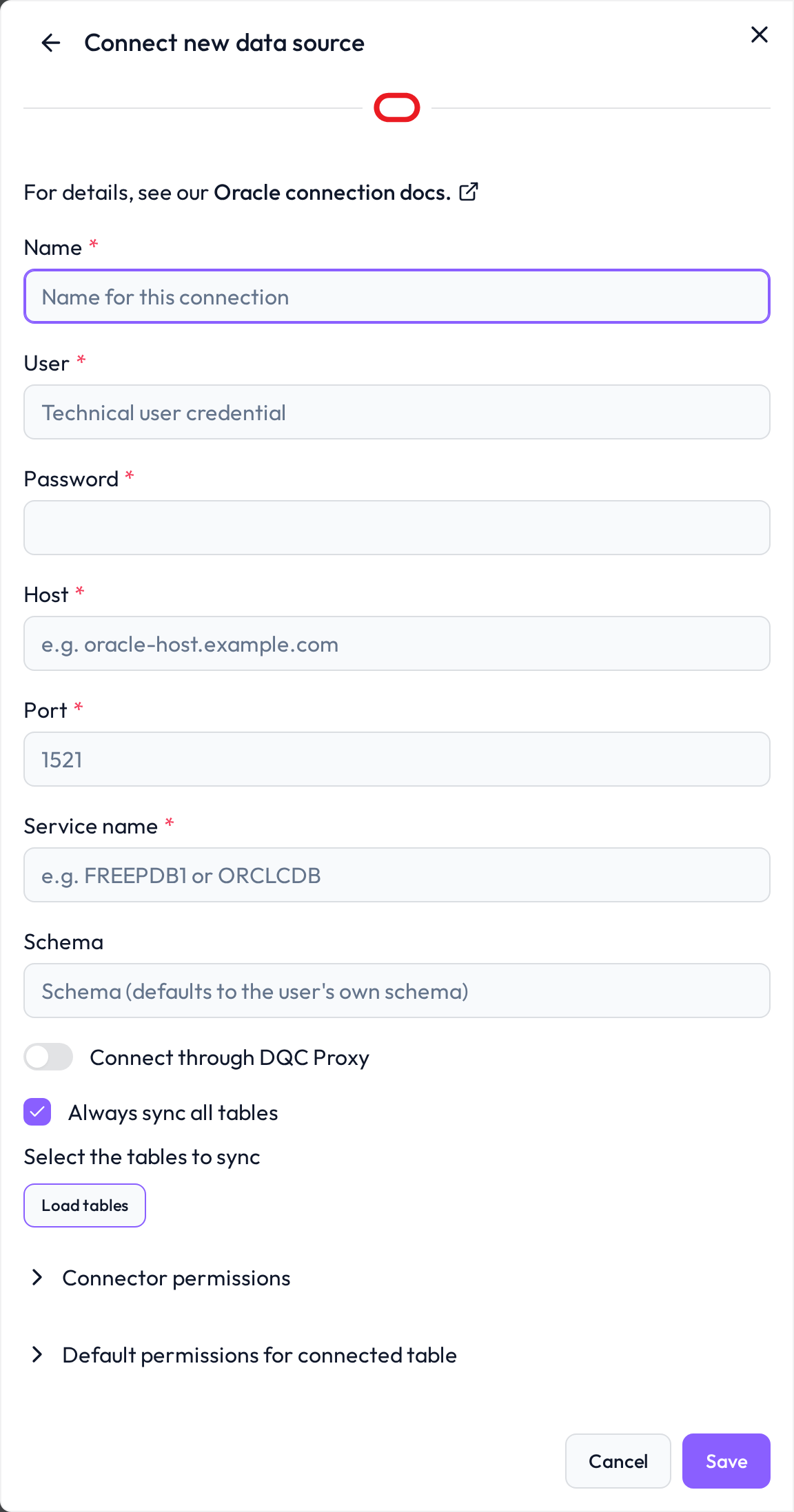
Required connection information
Field | Example | Description |
|---|---|---|
Name | Finance_DB | A descriptive name for this connection |
User | DQCREADER | Oracle user with read-only access |
Password | your_password_here | Password for the specified user |
Host | oracle.company.internal | DNS name or IP address of the Oracle server |
Port | 1521 | Default Oracle listener port (adjust if needed) |
Service name | ORCLPDB1 | The service name of the target database — not an SID and not a file path |
Schema | FINANCE (optional) | Default schema for unqualified table names; must be uppercase |
Service name, not SID
The connector addresses the database by its service name. If you only know the SID, ask your DBA for the corresponding service name, or read it from the listener:
lsnrctl servicesA wrong or unknown service name is rejected by the listener before authentication happens, which surfaces as ORA-12514. A host name that cannot be resolved surfaces as ORA-12545, and an unreachable listener as ORA-12541.
Schema names must be uppercase
Oracle stores unquoted identifiers in uppercase. The optional Schema field therefore only accepts uppercase names — allowed characters are uppercase letters, digits, underscore, dollar sign and hash, and the name must start with an uppercase letter or an underscore. The interface uppercases the value as you type; API clients have to send it already normalised, otherwise the connection is rejected with a validation error.
Leave the field empty to work with fully qualified table names instead. When it is set, the platform switches the session's current schema so unqualified names resolve there.
Best practices for secure authentication
Use a dedicated user
Avoid using administrative or shared credentials
Create a dedicated technical user for the DQC Platform
Grant read-only permissions
The user needs to log in and to read the tables you want to check — nothing else. For example:
CREATE USER dqcreader IDENTIFIED BY "your_password_here";
GRANT CREATE SESSION TO dqcreader;
GRANT SELECT ON finance.customers TO dqcreader;
GRANT SELECT ON finance.orders TO dqcreader;
Grant SELECT per table or per schema as your governance rules require. The platform runs its queries directly against the database and does not create views, tables or any other objects, so the user needs no CREATE privileges beyond CREATE SESSION.
Whitelist the DQC Platform IP address
Allow inbound connections from the following static IP address in your firewall, security group, or Oracle Connection Manager rules:
3.123.94.228For Oracle Autonomous Database or Oracle Cloud Infrastructure, add the address to the access control list of the database or to the security list of its subnet.
Troubleshooting
When DQC cannot connect to Oracle Database or load its tables, it shows the reason with a short fix and links to this section. Look up the beginning of the message:
Message in DQC | Likely cause | Fix |
|---|---|---|
| ORA-01017: wrong user name or password | Check user name and password |
| ORA-28000: the account is locked | Ask your DBA to unlock the account |
| ORA-12514: wrong or unknown service name | Enter the service name, not the SID (see Service name, not SID) |
| ORA-12545: the host name cannot be resolved | Check the host name |
| ORA-12541/ORA-12170: no listener or a firewall blocks the DQC IP address | Check host and port, whitelist the DQC Platform IP address, or connect through the DQC Proxy |
| A network or driver error of the thin driver, for example a refused connection or a server that requires Native Network Encryption | Act on the reason; for a refused connection check host, port and firewall |
| The schema field contains lowercase letters or invalid characters | Enter the schema in uppercase (see Schema names must be uppercase) |
| No user with that schema name exists | Check the schema name |
| DQC could not classify the error of the connection test | Check every field of the form, the network access and the permissions described above |
| The table was renamed, moved or deleted, or the user lost access to it after the last sync | Restore the table or the access, then resync the connector |
Synchronization failed: when a sync cannot connect, the connector shows Failed on the Data sources screen and the badge links to this section. Edit the connector and click Load tables or Save: DQC tests the connection again and shows the current reason.
Tables missing from the table list: grant
SELECTon the tables to the user (see Grant read-only permissions).Still stuck? Write to support@dqc.ai with the connector name, the time of the attempt and the full message.
Notes
Encrypted connections are strongly recommended; Oracle Native Network Encryption and TLS are both supported by the driver
ORA-01017 means the user name or password is wrong, ORA-28000 means the account is locked
Virtual tables and custom SQL rules are available for Oracle connections
Learn more: Supported data sources